
Overview
A quiet, tiled Wayland desktop written in Zig on top of wlroots.
Tessa is a compositor and a small shell: a floating taskbar, a searchable launcher, the wallpaper, tiling layouts, workspaces, and the window borders are all part of this repository. Tessa Panel is the default; Waybar/Rofi/wofi are not required, but layer-shell-compatible external bars and launchers can replace it.
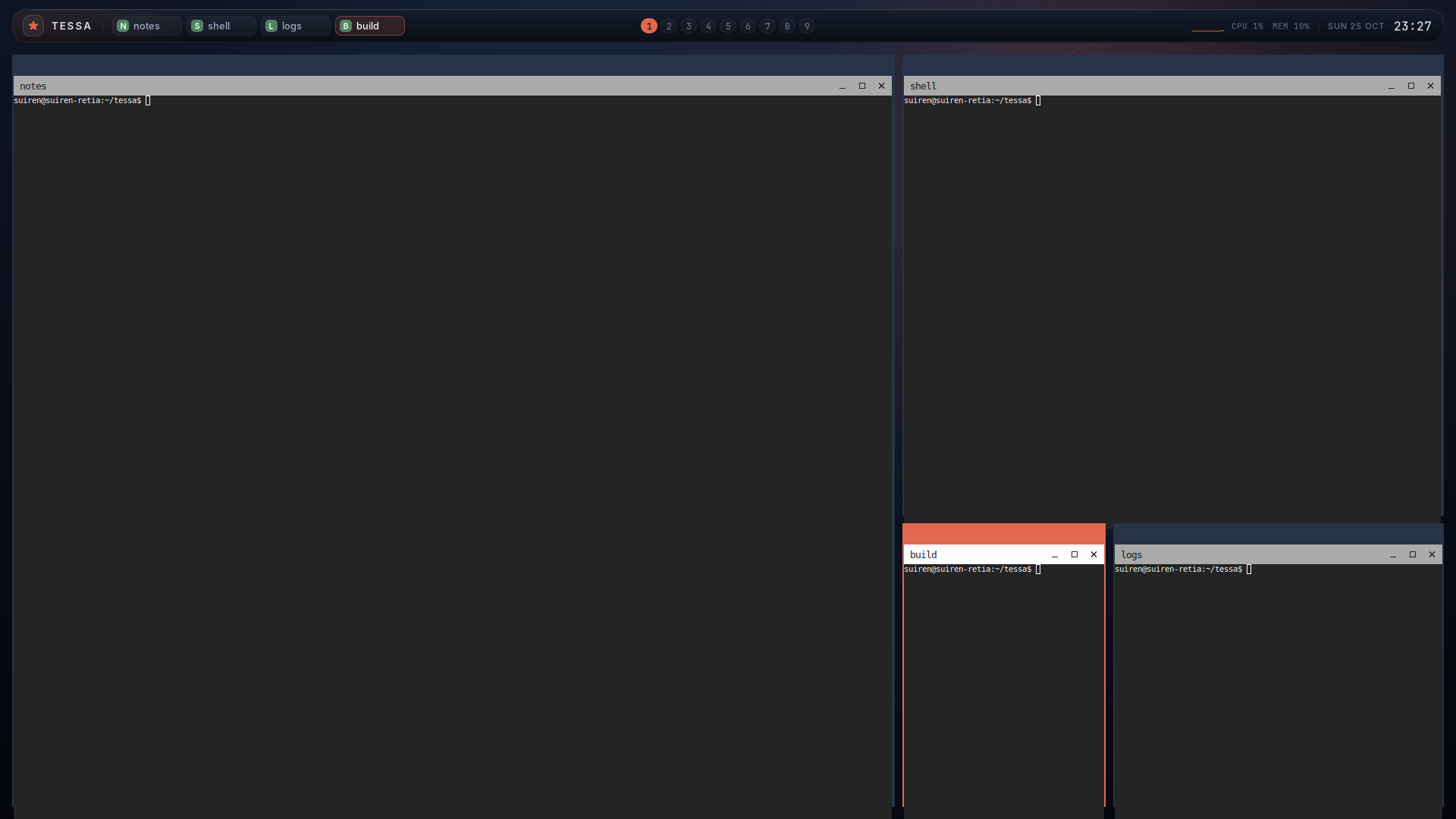
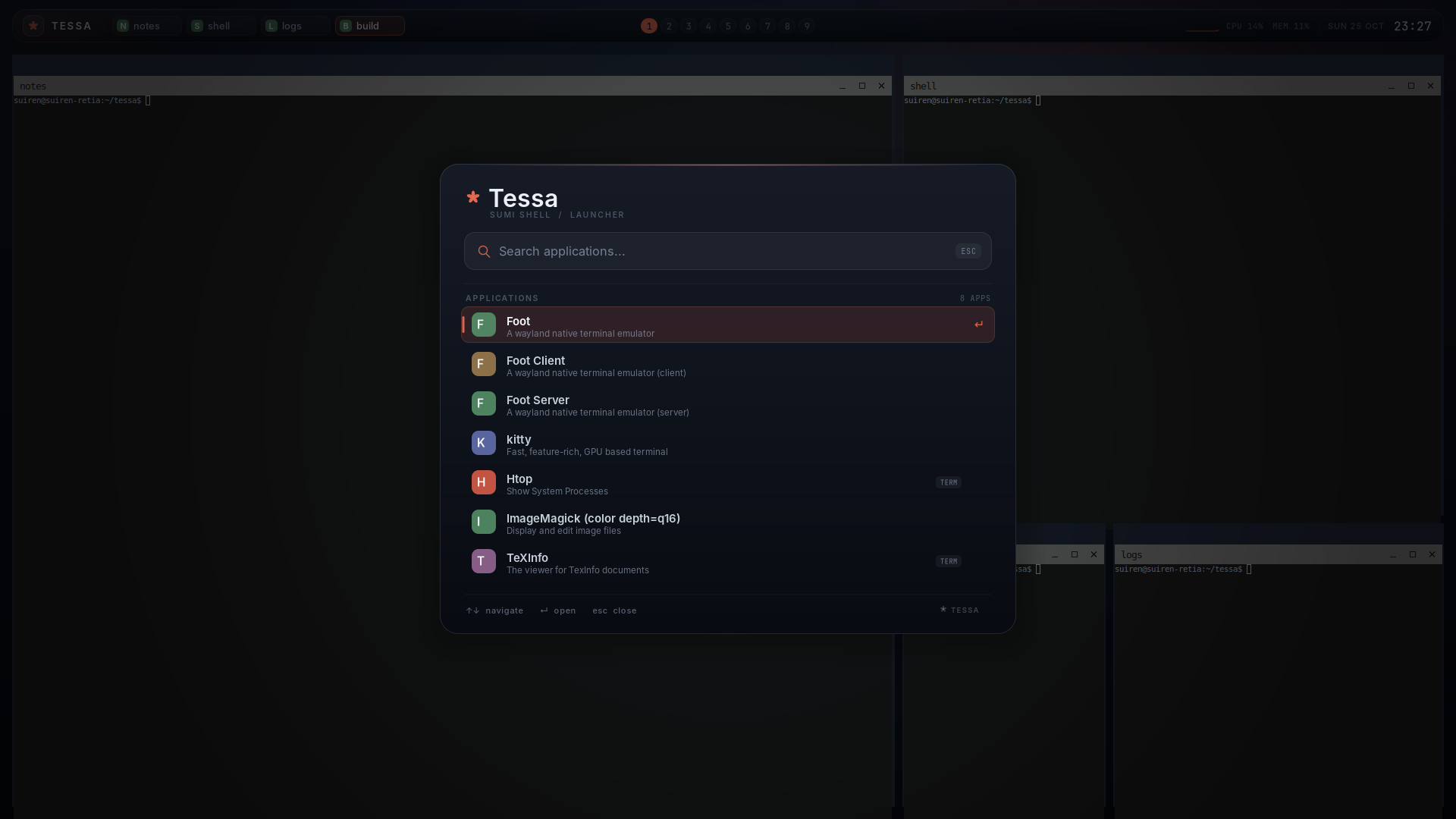
The screenshots above are from a headless development session, using foot as the terminal.
For a single end-to-end reference covering build, installation, every config key, rules, effects, IPC, events, and hooks, see the complete setup and customization guide.
Install on Ubuntu 26.04
Section titled “Install on Ubuntu 26.04”A prebuilt amd64 package is available on the v0.2.4 release page. This is the recommended install path; Zig and the wlroots development headers are not needed for the binary package.
sudo apt updatesudo apt install curlcurl -fLO https://github.com/Keychrom/Tessa/releases/download/v0.2.4/tessa_0.2.4_amd64.debcurl -fLO https://github.com/Keychrom/Tessa/releases/download/v0.2.4/SHA256SUMSgrep ' tessa_0.2.4_amd64.deb$' SHA256SUMS | sha256sum -c -sudo apt install ./tessa_0.2.4_amd64.deb0.2.4 may be the final
.debrelease. It is the last package planned against Zig 0.16 and wlroots 0.19. The current source tree (0.2.5) targets Zig 0.17, wlroots 0.20, and scenefx 0.5; build from source or use the Arch package for the new toolchain.
apt installs the runtime libraries, the compositor, panel, CLI, session
entry, example config, portal selector, and man pages. Useful runtime
extras:
sudo apt install kitty wlr-randr grim dbus \ fcitx5 fcitx5-mozc \ xdg-desktop-portal xdg-desktop-portal-wlr pipewirexwayland-satellite is not in Ubuntu 26.04; install it from upstream if you
need X11 applications. xwayland = true is the default and logs a warning
until satellite is available.
Log out and select Tessa in GDM, SDDM, or another display manager. The
.deb already installs /usr/share/wayland-sessions/tessa.desktop, so the
source session installer below is only needed for development.
For a quick first test from a TTY:
tessaQuit with Super+Shift+E. Verify the package with:
dpkg -s tessatessa-ctl config-checkIf Tessa was previously installed manually under /usr/local, choose one
installation method. /usr/local/bin usually precedes /usr/bin in PATH, so
the manual binaries would otherwise continue to be used.
Install on Arch Linux
Section titled “Install on Arch Linux”Tessa requires Zig 0.17, wlroots 0.20, and scenefx 0.5. All are
available in the official repositories as zig, wlroots0.20, and scenefx.
Install the build dependencies:
sudo pacman -Syu --needed base-devel git zig wlroots0.20 scenefx \ wayland wayland-protocols libxkbcommon libinput pixman libdrm \ libseat libudev libegl libgles2 mesa cairo pango glib2Then build and install Tessa from its PKGBUILD:
git clone https://github.com/Keychrom/Tessa.gitcd Tessa/packaging/archmakepkg -siThe tessa-git package installs the compositor, panel, CLI, session entry,
example config, portal selector, man pages, and documentation under /usr.
Verify the result with:
tessa-ctl config-checkcommand -v tessa tessa-panel tessa-ctlUseful extras:
sudo pacman -S --needed kitty wlr-randr grim dbus fcitx5 fcitx5-mozc \ xdg-desktop-portal xdg-desktop-portal-wlr pipewireFor X11 applications, install the AUR xwayland-satellite-git package.
The PKGBUILD depends on scenefx and builds with rounded corners and backdrop
blur by default. For a plain wlroots scene without those effects, build from
source with -Dscenefx=false. Log in on a TTY and run tessa, or select
Tessa in your display manager.
The 0.2.4 Arch package was exercised on Arch Linux with the 0.16/0.19 AUR
toolchain, including a real session and plain/scenefx builds. The 0.2.5
PKGBUILD has been built and installed on Arch Linux with the official zig
0.17 and wlroots0.20 packages, and the full headless suite passes in both
plain and scenefx builds. If makepkg reports an ABI or dependency problem,
confirm that zig version is 0.17.x and
pkg-config --modversion wlroots-0.20 reports 0.20.x.
build.zig forces LLVM/LLD for every build mode, so the glibc 2.43/GCC 16
R_X86_64_PC64 relocation problem seen with older Zig self-hosted linking
does not require a special optimize mode.
Status
Section titled “Status”The current development tree is 0.2.5; 0.2.4 remains the latest binary
release. Tessa is usable and the core pieces are implemented. The 0.7
customization-parity roadmap items are complete; see
docs/ROADMAP.md.
Highlights include:
- wlroots 0.20 compositor in Zig (DRM, headless, and nested backends via wlroots’ autodetection)
- xdg-shell toplevels, layer-shell, data-device and primary-selection (clipboard), xdg-activation, xdg-decoration, cursor-shape-v1, and wlr-screencopy (grim works)
- master/stack, Tessa “mosaic” spiral, grid, equal-column, Niri-style scrolling,
monocle, and deck-style stacking layouts, with per-workspace layout profiles
(
Super+Tcycles); configurable master count, mosaic ratio/size, grid columns, column widths/presets, focus centering, and per-workspace gaps/master ratio; explicit runtime choices are restored on restart, and config reload updates workspaces without a runtime override - dynamic tiling reorder from IPC (
reorder,swap) or by dragging a tiled window withSuper+left mouse; in scrolling layouts the drag inserts a column andSuper+wheel scrolls the viewport - declarative window rules matched by app-id/title/output or boolean POSIX-regex expressions, with floating, workspace, fullscreen, size, position, per-window border colors, opacity, rounding, blur, shadow, tint, and border width; layer-shell rules by namespace, output, and layer
- external layout-helper v2 for custom tiling algorithms: one asynchronous process per output, coalesced requests, focus/urgent metadata, version negotiation, timeout, restart, and built-in fallback
- named special workspaces: hidden per-output overlays assigned by rule or command, with toggle/move bindings, IPC control, focus handling, and separate visibility from the scratchpad
- long-lived effect-helper protocol v2 that receives window state and returns per-window opacity, corner radius, blur/shadow, border-width, tint, and animation overrides; requests are coalesced, v1 helpers remain compatible, and there is no in-process plugin VM
- supervised extensions declared in config with a stable v1 API, capability
scopes, rotating tokens, and
requires/afterdependencies; pidfd supervision, ready timeout, restart backoff, lifecycle events,tessa-ctl extensions, and an Extensions popover - selectable panel modules (
panel_modules) so an external Waybar/Quickshell bar can coexist with Tessa notifications, launcher, or popovers - composable shell v2 bar modules with configurable order and visibility, per-surface bar/launcher/popover/toast fonts and foreground/background colors, PNG or PPM-shader wallpaper sources, and layer-rule styling for the bar, popovers, and toasts
- compositor-context bar modules (
layout,groups,mode,effects), a module registry viatessa-panel --list-modules, theme-token export viatessa-panel --theme-json, directory theme packages with hot reload, declarative status widgets with icon/priority and file-backed popovers, priority-based bar overflow with a+Nhidden-module list, and shell role ownership viatessa-ctl shell - frame-time instrumentation (
tessa-ctl perf) with a configurableframe_time_budget, plus headless animation and full-effect benchmarks - direct scanout for full-output fullscreen clients, with scanout/zero-copy/
tearing counters in
tessa-ctl renderingand presented/vsync/missed plus frame timings intessa-ctl perf; opt-inwp-tearing-control-v1with a driver test and normal-flip fallback, and gatedlinux-drm-syncobj-v1explicit sync. HDR color management is investigated but not advertised yet; see docs/RENDERING.md - interactive config editing with validation and effective-config diff preview
(
tessa-ctl config-check <file>,config-diff <file>,config-edit) and offline preflight withtessa --check-config [file] - supervised built-in panel: pidfd-based exit detection with bounded exponential backoff, so a panel crash does not take down the bar for the session
- fuzzing and sanitizer boundary passes for the config and IPC parsers
(
tests/fuzz-parsers.sh,tests/fuzz-asan.sh), plus strict helper-timeout regression coverage - file/line config diagnostics, automatic reload on atomic config saves, transactional reload, and versioned JSON state/config snapshots for external tools; per-workspace and per-output layout/gap/master rules; animation lifecycle hooks
- named layout profiles shared by output and workspace rules, plus per-output theme rules for backgrounds, borders, wallpaper, and panel dimensions
- per-device libinput policy for touchpads, mice, and other pointers: tap and drag, natural scrolling, acceleration, scroll/click methods, button maps, and disable-while-typing, with live reload and original-state restoration; monitor rules matched by connector, EDID make/model/serial, or both, plus VRR/adaptive-sync policy and cursor theme/size
- config-defined event rules with expression filtering and command actions
- named input modes with mode-specific key bindings, leader keys,
enter-mode, and per-mode timeouts - semantic theme roles for accent, borders, wallpaper, and the panel
- configurable bar height, top/side margins, and bar background/foreground colors
- window open/workspace slide animations with per-kind durations, named cubic-bezier and spring curves, per-window enable/duration/curve overrides, configurable offsets, close scale/fade snapshots, reduced-motion close fades, and soft layered shadows; scenefx rounded corners and backdrop blur for windows and shell surfaces by default; configurable wallpaper gradient colors, a PNG wallpaper source with cover/contain/stretch fit, and an art on/off switch
- nine workspaces per output, floating windows, fullscreen, click-to-focus; optional global workspace names for bar labels, bindings, IPC, and window rules; a per-output floating scratchpad overlay and tabbed workspace window groups
- multi-monitor support: a bar/background and independent active workspace on
every output; panels are auto-started per output; workspace-to-output pins;
output management via
wlr-randr, persisted across restarts; fractional Wayland scaling throughwp_fractional_scale_v1and integer HiDPI panel buffer scaling - external extension API: line events, JSON-RPC with request ids and
capabilities, JSON event notifications, config hooks and event rules, custom
bar status entries, custom launcher entries, and the
tessa-ctlautomation client relative-pointer-v1for games and pointer-look applicationswlr-virtual-pointer-v1for scripted pointer automation and headless testspointer-constraints-v1locked/confined pointers, activated with window focus- touchpad gestures: three-finger (configurable) horizontal workspace swipes and upward launcher swipes; other finger counts and pinch/hold gestures are forwarded to the focused client
- touch input, including the panel UI, and tablet-v2 pen/pad support (pressure, tilt, rotation, tool buttons, rings, and strips)
- layer-shell popups from third-party clients (panel menus, dropdowns)
- external layer-shell shells: Waybar, Wofi, and Quickshell-compatible bars and
launchers,
ext-workspace-v1groups with nine workspaces per output, foreign-toplevel output tracking, andON_DEMANDclick focus ext-session-lock-v1session locking, plusext-idle-notify-v1,idle-inhibit-v1, and output-power management for tools such as swayidle and wlopm- keyboard layout/variant/options and key-repeat settings in the config, with
Super+Rreload - text-input-v3 + input-method-v2 IME relay with input-popup placement; verified end to end with Fcitx5 + Mozc in the launcher and Wayland clients
- XWayland through
xwayland-satellite: rootless X11 apps are managed as normal Tessa toplevels, andDISPLAYis exported to spawned applications - XIM integration:
XMODIFIERSis exported for X11 clients and an optionalxim_startcommand launches the input method after the X display appears - integrated panel in Zig + Cairo/Pango:
- ink/sun wallpaper
- floating taskbar with workspace pills, window chips, clock, CPU/RAM
- searchable application launcher with keyboard navigation and IME input
- clock popover with a month calendar and a power menu with configurable lock/suspend/reboot/shutdown commands
- memory-only clipboard history with
Super+Vand click-to-copy - region/full-output screenshot UI using
wlr-screencopy, saved as PNG org.freedesktop.Notificationsservice with action buttons, default-action activation, image/data icons, Pango markup, replacement, close, expiry, and routing to the focused output- battery and default-route network indicators
- MPRIS media chip and controls (
Super+M) - StatusNotifier tray watcher/host with icon rendering and activation
(
Super+Shift+T) - volume indicator and popover through
wpctl,pactl, oramixer(Super+Shift+A), with configurable command overrides - compositor-side xdg-desktop-portal support: screencopy, dmabuf, output
capture sources, image-copy capture, and foreign-toplevel lists for
xdg-desktop-portal-wlr+ PipeWire screen sharing
- line-based IPC with explicit state/event subscriptions and a
tessa-ctlCLI - line-based configuration file with includes and event hooks
Tessa 0.2.4 was built and tested on Ubuntu 26.04 and Arch Linux with Zig 0.16.0
and wlroots 0.19.2, primarily in the headless pixman backend with grim,
wtype, Fcitx5 + Mozc, and X11 clients through xwayland-satellite; the Arch
host also runs the compositor in a real session for display, keyboard, mouse,
IME, and browser checks. Dual-headless-output
workspaces, per-output panels, session locking across outputs, and wlr-randr
output management were also verified. Event hooks, the event stream, custom
status entries, custom launcher entries, config reload, per-workspace
master/mosaic/grid/columns layouts, 2x HiDPI panel scaling, fractional output
scale changes, and output mode/position/scale and layout persistence across
restarts were exercised by
tests/smoke.sh, tests/output-persistence.sh, tests/layout-geometry.sh,
tests/customization.sh, tests/layout-helper.sh, tests/layout-helper-v2.sh,
tests/config-validation.sh,
tests/config-watch.sh, tests/json-ipc.sh, tests/modes.sh,
tests/panel-theme.sh,
tests/panel-popovers.sh, tests/clipboard.sh, tests/screenshot.sh,
tests/notifications.sh, tests/notification-routing.sh,
tests/system-status.sh, tests/media.sh, tests/tray.sh, tests/audio.sh,
tests/foreign-toplevels.sh, tests/animations.sh, tests/motion.sh,
tests/motion-overrides.sh, tests/effects.sh, tests/rule-visuals.sh,
tests/input.sh, tests/ime-keyboard.sh,
tests/ext-workspace.sh, tests/external-shell.sh,
tests/pointer-constraints.sh, tests/xim.sh,
tests/fractional-scale.sh, tests/cursor-theme.sh,
tests/linux-dmabuf.sh, tests/spawn-signals.sh,
tests/xwayland-ready.sh, tests/kitty-startup.sh,
tests/xwayland-kitty.sh, tests/workspace-pinning.sh,
tests/output-rules.sh, tests/rule-expressions.sh, tests/event-rules.sh,
tests/output-themes.sh, tests/theme-roles.sh, tests/reduced-motion.sh,
tests/profiles.sh, tests/json-rpc.sh, tests/interaction.sh,
tests/popups.sh, tests/portal.sh, tests/special-workspaces.sh,
tests/scratchpad.sh, tests/window-groups.sh, tests/workspace-names.sh,
tests/wallpaper-image.sh, tests/terminal-fallback.sh,
tests/shell-v2.sh, tests/effect-helper.sh, tests/performance.sh,
tests/rendering.sh, tests/tearing.sh,
tests/config-editor.sh, tests/panel-recovery.sh, tests/ipc-version.sh,
tests/helper-timeouts.sh, tests/fuzz-parsers.sh, and
tests/fuzz-asan.sh.
The 0.2.5 source tree targets Zig 0.17.0, wlroots 0.20.2, and scenefx 0.5. The
full headless suite passes on Arch Linux against those libraries in
both plain and scenefx builds, including end-to-end portal ScreenCast, tray,
notifications, pointer interaction, and scenefx corner rendering. The 0.2.5
tree additionally passes tests/layout-scrolling.sh, tests/layout-modes.sh,
tests/layout-reorder.sh, tests/layout-config.sh, tests/extensions.sh,
tests/extension-api.sh, tests/panel-modules.sh, tests/effect-v2.sh, and
tests/effect-cache.sh.
A real DRM/libinput session on the new toolchain is still pending.
The portal test performs an end-to-end ScreenCast when the portal and PipeWire
services are installed; otherwise it skips. tests/effects.sh exercises rounded
corners in scenefx builds (the default) and skips when the binary was built with
-Dscenefx=false. The Kitty and real
XWayland integration tests skip when Kitty, wlr-randr, or
xwayland-satellite is unavailable; tests/xwayland-ready.sh uses a fake
satellite so DISPLAY readiness is covered everywhere.
Physical Arch Linux validation covers an eDP-1 DRM session, keyboard/mouse,
IME, and XWayland clients; per-device touchpad tuning and VRR remain tracked in
Known limitations.
Why another tiling WM?
Section titled “Why another tiling WM?”Tessa’s goal is not to out-feature Hyprland. It is a different, more compact desktop:
- Integrated shell. The bar, launcher, wallpaper, and tiling live together. The palette and behavior are consistent because they are one project.
- A different layout. Besides master/stack, Tessa has a spiral “tessera”
mosaic layout, a balanced grid, equal columns, a Niri-style scrolling strip,
monocle, and deck-style stacking (
Super+Tcycles the configured list). Tiled windows can be reordered by dragging them or from the IPC. The name Tessa comes from tessellation. - Sumi-e visual language. Indigo paper, ink washes, a vermilion sun, grain, and a floating glass-like bar. The panel is not a generic status bar with a theme on top.
- Small, direct implementation. Zig + wlroots, a line config, a line IPC protocol, and small C shims for Pango, GDBus, and mixer commands.
- Reliability-first. Configs can be validated offline before restart, reloads are transactional, helper processes have strict 100/200 ms fallback contracts, and the built-in panel is supervised. Fuzz and ASan passes cover the config and IPC parsers.
- No JavaScript/TypeScript runtime. Unlike ShojiWM, the shell and config are fixed and small. If you want to program every pixel in TSX, ShojiWM is the better tool. If you want animations, blur, and a huge plugin ecosystem, Hyprland is the better tool. Tessa sits in the “quiet, integrated, hackable Zig compositor” niche.
The terminal is intentionally not implemented from scratch. The default
terminal is kitty; set terminal = foot if you prefer foot.
Build from source (development)
Section titled “Build from source (development)”Use this path for development, unsupported distributions, or a plain
no-scenefx build. The .deb and Arch tessa-git package above are sufficient
for normal use on their respective distributions.
Requirements:
- Zig 0.17.0
- wlroots 0.20 development files, discoverable with
pkg-config --modversion wlroots-0.20 - scenefx 0.5 development files for the
default rounded corners and backdrop blur build
(
pkg-config --modversion scenefx-0.5) - Wayland, xkbcommon, pixman, libdrm, libinput, libseat, libudev, EGL/GLES, and wayland-protocols >= 1.47 (for the generated enum headers)
- Cairo, Pango, and GLib/GIO development files for the panel and notifications
- fonts: Inter, JetBrains Mono, and a CJK font such as Noto Sans CJK JP
- optional:
xwayland-satellitefor X11 applications (auto-started whenxwayland = true) - optional: Fcitx5 + Mozc (or another input method that implements
zwp_input_method_v2) for Japanese input - optional:
wlr-randrfor runtime output mode/position/scale changes - optional: a D-Bus session bus for desktop notifications, tray, and portals
- optional:
wpctl(PipeWire),pactl(PulseAudio), oramixer(ALSA) for volume control - optional:
xdg-desktop-portal,xdg-desktop-portal-wlr, and PipeWire for screen sharing (installpackaging/portal/tessa.portalas described below)
Distribution packaging definitions live in packaging/ and debian/:
packaging/arch/PKGBUILD and the debhelper debian/ tree both install the
compositor, panel, CLI, session file, example config, and the
xdg-desktop-portal backend selector. To build a Debian binary package:
ZIG="$HOME/.local/zig-0.17.0/zig" ./scripts/build-deb.sh# result: dist/tessa_<version>_<arch>.debThe .deb path is retained for downstream packaging, but 0.2.4 remains the
last published Debian package; debian/control now expects
libwlroots-0.20-dev.
See packaging/README.md.
For screen sharing, install xdg-desktop-portal, xdg-desktop-portal-wlr, and
PipeWire. The packaged selector is
packaging/portal/tessa.portal; a system install places it at
/usr/share/xdg-desktop-portal/portals/tessa.portal. It routes the Screenshot
and ScreenCast portals to the wlr backend for XDG_CURRENT_DESKTOP=Tessa.
xdpw needs a source chooser; for a single monitor set
chooser_type=none and output_name=<output> in
~/.config/xdg-desktop-portal-wlr/config.
On Ubuntu 26.04, install Zig 0.17 from upstream if the distribution package is older, then the development headers:
sudo apt install build-essential pkg-config git \ libwayland-dev wayland-protocols libwlroots-0.20-dev \ libxkbcommon-dev libpixman-1-dev libdrm-dev libinput-dev \ libseat-dev libudev-dev libegl-dev libgles2-mesa-dev \ libcairo2-dev libpango1.0-dev libglib2.0-dev libfontconfig1-dev \ fonts-inter fonts-jetbrains-mono fonts-noto-cjk \ xwayland xauth xterm fcitx5 fcitx5-mozcUbuntu 26.04 has no scenefx 0.5 development package. Build scenefx from source
for the default effects build, or pass -Dscenefx=false to build the plain
wlroots scene.
On Arch Linux, install the official zig, wlroots0.20, and scenefx packages
as described in Install on Arch Linux. The default
build uses scenefx 0.5; use -Dscenefx=false to build the plain wlroots
scene instead. scripts/build.sh requires Zig 0.17.x; ZIG=/path/to/zig
overrides the compiler. Do not use Zig 0.16 or wlroots 0.19 for this tree.
xwayland-satellite is not packaged everywhere; install it into PATH (for
example ~/.local/bin/xwayland-satellite), or set TESSA_XWAYLAND_BIN to its
absolute path. Tessa does not use wlroots’ built-in XWayland; satellite gives
rootless X11 windows to the compositor as ordinary xdg-shell toplevels.
If wlroots 0.20 is installed under /usr/local (for example when built from source),
make sure its .pc file and shared library are found:
pkg-config --modversion wlroots-0.20ldconfig -p | grep wlrootsBuild:
chmod +x scripts/*.sh scripts/tessa-session # once, if not preserved./scripts/build.sh -Doptimize=ReleaseSafeRounded corners and backdrop blur are enabled by default. Install scenefx 0.5 (the wlroots 0.20 series), then build normally:
./scripts/build.sh -Doptimize=ReleaseSafeThis switches the scene and renderer to scenefx’s GLES2 path;
WLR_RENDERER=pixman is not available in that binary. For a plain build that
keeps the upstream wlroots scene and supports both GL and software rendering,
disable scenefx explicitly:
./scripts/build.sh -Doptimize=ReleaseSafe -Dscenefx=falseIf scenefx is installed under a non-system prefix, export its pkg-config and library paths when building and running.
This produces:
zig-out/bin/tessa— the compositorzig-out/bin/tessa-panel— the shell panel (one process per output, auto-started by tessa)zig-out/bin/tessa-ctl— state/event/automation client for scripts and extensions
The generated Wayland protocol headers are committed under protocol/, so a
wlroots installation without generated xdg-shell-protocol.h still builds.
From a TTY (recommended first test)
Section titled “From a TTY (recommended first test)”Log in on the target machine’s console, not over SSH, and run from the active virtual terminal. For a package install:
tessaFor a source build:
cd /path/to/TessaPATH="$PWD/zig-out/bin:$PATH" ./zig-out/bin/tessawlroots autodetects the DRM backend and libinput. Tessa starts one
tessa-panel process per output from PATH, so include zig-out/bin or
install the binaries. The default terminal is kitty; install it, or set
terminal = foot in the config.
Display manager / session file
Section titled “Display manager / session file”The binary package already installs the session entry. Use this only when running from a source build:
# install to ~/.local./scripts/install-session.sh
# or system-widesudo PREFIX=/usr/local ./scripts/install-session.sh
Then log out and choose Tessa in GDM/SDDM/greetd. The session file runs
tessa-session, which puts its own directory at the front of PATH and starts
tessa.
Headless development over SSH
Section titled “Headless development over SSH”This is the headless workflow used during development. Start the compositor:
./scripts/run-headless.shIn another shell, take a screenshot:
./scripts/screenshot.sh /tmp/tessa.pngBecause the headless backend starts without physical input devices, Tessa
creates a fallback keyboard with a standard XKB keymap. This lets the panel,
IME, and XWayland start correctly. Use IPC for mouse/state changes, or inject
keyboard input with wtype:
XDG_RUNTIME_DIR=/tmp/tessa-headless WAYLAND_DISPLAY=wayland-0 \ wtype "foot"XDG_RUNTIME_DIR=/tmp/tessa-headless WAYLAND_DISPLAY=wayland-0 \ wtype -k Returnwtype connects through the virtual-keyboard protocol; it types into whichever
surface currently has keyboard focus. This is also how the IME and panel
keyboard paths are tested without a TTY.
See docs/DEVELOPMENT.md for the headless workflow and docs/EXTENDING.md for scripting and extension APIs. The stable v1 contract is docs/EXTENSION-API.md.
Input methods
Section titled “Input methods”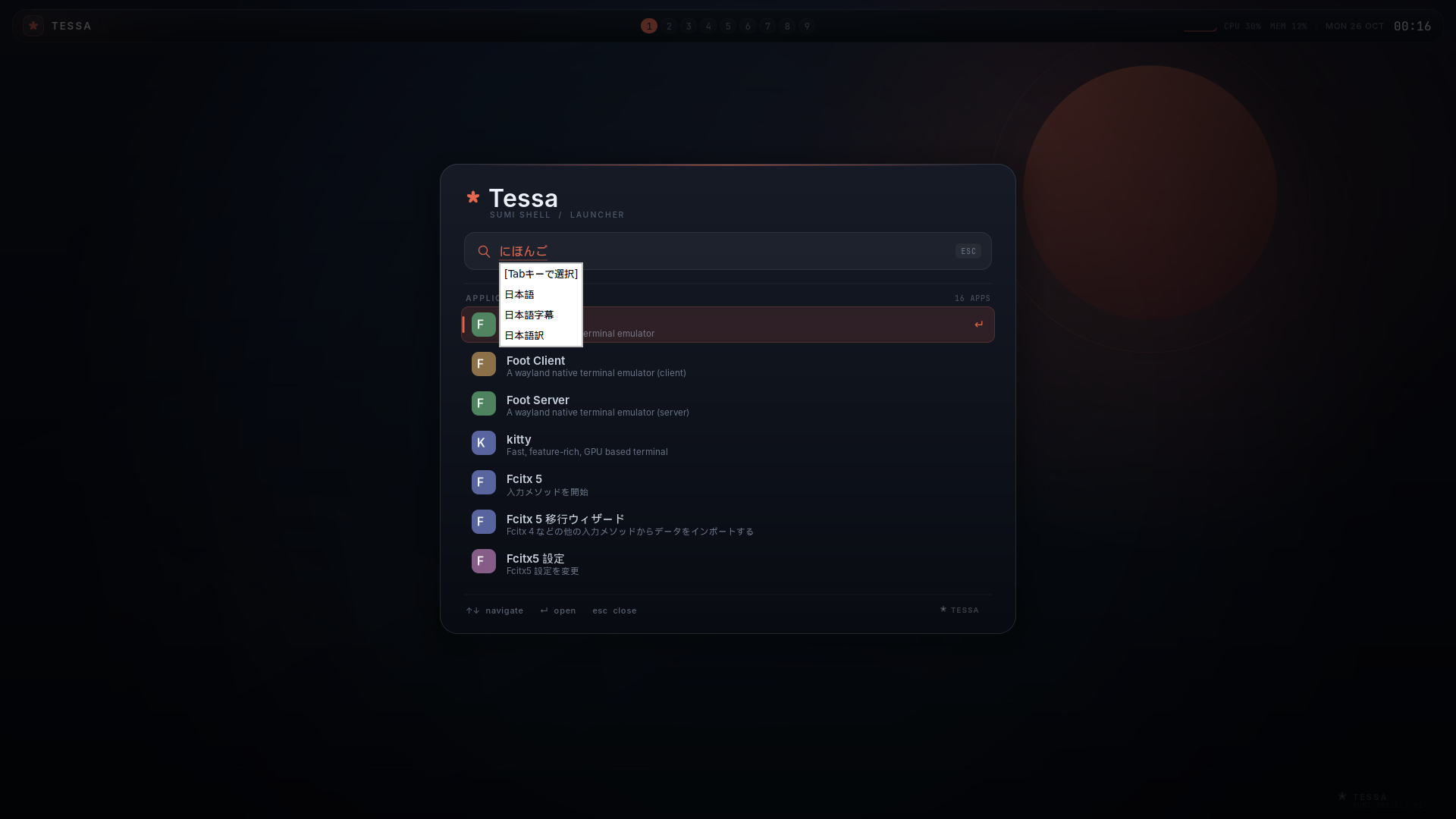
Tessa implements the zwp_text_input_v3 (client) and
zwp_input_method_v2 (input method) protocols and relays focus, surrounding
text, cursor rectangles, preedit, committed text, and deletion. Input-method
popup surfaces (the candidate window) are positioned below the text cursor with
output-edge clamping.
Tested with Fcitx5 + Mozc:
sudo apt install fcitx5 fcitx5-mozcStart Fcitx5 inside the Tessa session (for example through TESSA_STARTUP or
your compositor’s spawn command). You do not need to set GTK_IM_MODULE or
QT_IM_MODULE for Wayland-native clients: they use the Wayland text-input
protocol. For X11 clients, Tessa exports XMODIFIERS=@im=fcitx (adjust
xim_server) and can start the XIM server itself with
xim_start = fcitx5 -d. The server is started only after the XWayland display
exists. Registration is verified with Fcitx5; toolkit-specific XIM behavior
still depends on the application.
Fcitx5 keeps a keyboard grab while it runs. Tessa forwards key events to that
grab and passes the input method’s virtual-keyboard output back to the focused
client, so applications that do not use text-input-v3 (for example Firefox)
still receive keys. Creating or destroying that virtual keyboard does not
re-enter keyboard focus, which avoids a text-input enable/activate loop.
Open the launcher with Super+D and type; the preedit is drawn in the search
field and the Fcitx candidate popup appears below it. Enter commits the
selection, and the committed text becomes part of the launcher query.
X11 applications
Section titled “X11 applications”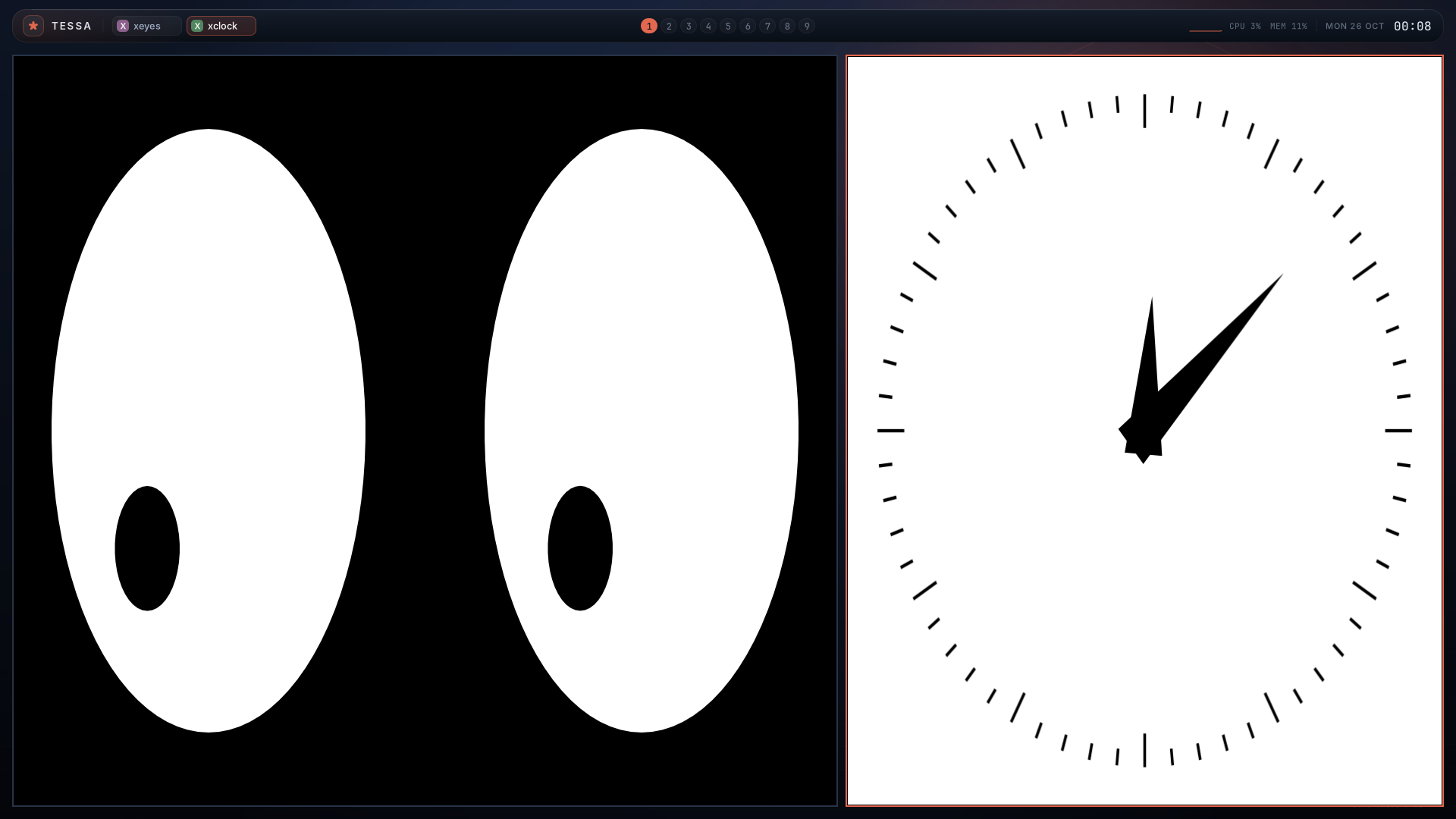
Tessa starts xwayland-satellite after the Wayland socket is ready and exports
the chosen display as DISPLAY. X11 applications are rootless: each X11
toplevel appears as a normal Tessa window and participates in tiling,
workspaces, focus, and the taskbar. Tessa advertises xdg-decoration in
server-side mode, so satellite does not draw its own titlebars; Tessa’s accent
border is used instead.
The display is chosen automatically by default (xwayland_display = auto),
starting at :0 and skipping displays whose sockets already exist. Set it to an
explicit value such as :1 if needed. Disable XWayland with xwayland = false
or TESSA_NO_XWAYLAND=1. If satellite is installed outside PATH, set
TESSA_XWAYLAND_BIN=/path/to/xwayland-satellite.
XWayland scaling is delegated to xwayland-satellite. Tessa advertises
wp_fractional_scale_v1 and wp_viewporter, so satellite can scale X11 clients
to fractional output scales; toolkits that ignore XSETTINGS may still render at
1x. Fractional X11 behavior needs validation on a machine with satellite
installed.
Lock and idle
Section titled “Lock and idle”Tessa implements ext-session-lock-v1, ext-idle-notify-v1, and
idle-inhibit-v1. A lock client and an idle daemon are separate programs:
sudo apt install swaylock swayidleSuper+Escape runs swaylock by default. If you prefer another locker, change
that binding with bind = SUPER+Escape spawn <command>. While locked, normal
desktop scene trees are hidden, virtual-keyboard injection is ignored, and the
lock surface receives keyboard/pointer focus. If the lock client dies while
locked, Tessa terminates the session instead of exposing the desktop.
swayidle can combine idle detection with locking and DPMS, for example:
sudo apt install wlopmswayidle -w \ timeout 300 'swaylock -f' \ timeout 600 'wlopm --off "*"' \ resume 'wlopm --on "*"'Idle notifications and inhibitor handling work, and a visible video/player can
inhibit idle through idle-inhibit-v1. Tessa implements the output-power
management protocol, so wlopm can turn outputs off and back on.
Multiple monitors
Section titled “Multiple monitors”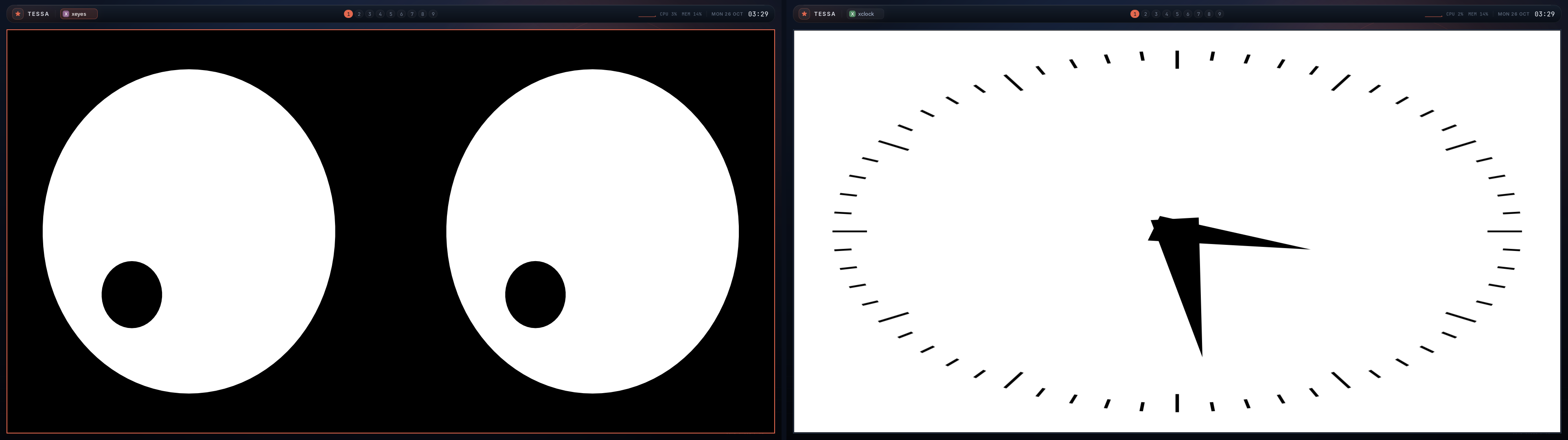
Every output gets its own background, bar, and independent active workspace.
Super+1 … Super+9 change the workspace of the focused output. Clicking or
scrolling a bar changes that monitor’s workspace and focuses that output.
workspace_pin = OUTPUT WORKSPACE overrides that target, so the shortcut and
bar always bring the pinned monitor forward; moving a window to a pinned
workspace transfers it to that output.
The launcher opens on the focused output, and new windows are placed there.
Super+Shift+H/J/K/L swaps within the current output first; when there is no
window in that direction it moves the focused window to the adjacent monitor.
Tessa auto-starts one tessa-panel process per output with
TESSA_PANEL_OUTPUT=<name>. If you disable auto-start (panel = false or
TESSA_NO_PANEL=1), start a panel for each output manually:
TESSA_PANEL_OUTPUT=HEADLESS-1 tessa-panelOutput modes, positions, scales, and transforms can be changed with wlr-randr;
Tessa implements wlr-output-management-unstable-v1. Applied settings are
saved to $XDG_CONFIG_HOME/tessa/outputs.conf (or
~/.config/tessa/outputs.conf) and restored when the outputs appear again.
Override the path with output_config in the main config or
TESSA_OUTPUT_CONFIG. For an explicit left/center arrangement, set positions
in logical layout coordinates (use the connector names printed by
wlr-randr):
wlr-randr --output DP-1 --pos 0,0wlr-randr --output HDMI-A-1 --pos 2560,0The change is saved immediately. Fractional-scale-aware Wayland clients receive
the exact output scale from wp_fractional_scale_v1, including runtime changes.
Clients without the protocol fall back to the ceiling of the output scale.
Panels use the ceiling as their integer Cairo buffer scale, so integer scales
are crisp and fractional scales are downsampled. XWayland scaling is handled by
xwayland-satellite, which can use the same fractional scale.
External bars and launchers
Section titled “External bars and launchers”Tessa Panel remains the default shell (panel = true). To use a layer-shell bar
or launcher from another desktop, disable the integrated panel and start the
program from startup:
panel = falsestartup = waybarpanel = false also disables Tessa’s background, notifications, and built-in
launcher; run your own wallpaper and notification daemon if needed.
Waybar 0.15 works with the standard layer-shell and ext-workspace-v1
protocols. For example:
{ "layer": "top", "position": "top", "height": 34, "modules-left": ["ext/workspaces"], "modules-center": ["wlr/taskbar"]}Tessa exposes one workspace group per output and nine workspaces in each group.
Workspaces carry their configured name (or 1…9), active/urgent state, and an
activate request. wlr-foreign-toplevel-management supplies the taskbar with
title, app_id, activation, close, and fullscreen, and follows windows when they
move between outputs.
Wofi and other layer-shell launchers work without extra configuration. To replace the built-in launcher binding:
bind = SUPER+D spawn wofi --show drunSet Wofi’s layer to overlay if it should stay above fullscreen windows.
Quickshell panels use layer-shell; Quickshell.WindowManager reads the
ext-workspace groups and ToplevelManager reads foreign-toplevel. A
PanelWindow with focusable: true requests ON_DEMAND keyboard focus and
receives it on click rather than at map time.
Coexistence notes:
- Tessa Panel and an external bar anchored to the same edge both reserve space.
Disable one with
panel = falsefor a single bar; different edges can coexist. - Tessa Panel’s tray, Waybar’s tray, and Quickshell’s
SystemTrayall try to ownorg.kde.StatusNotifierWatcher. Only one tray is populated; disable Tessa Panel when the external shell should own the tray. - Waybar’s minimize/maximize requests are accepted by the protocol but are no-ops because Tessa has no minimize/maximize state.
- GTK3 bars and launchers render at integer scale under fractional scaling; this is a client limitation.
Extensions
Section titled “Extensions”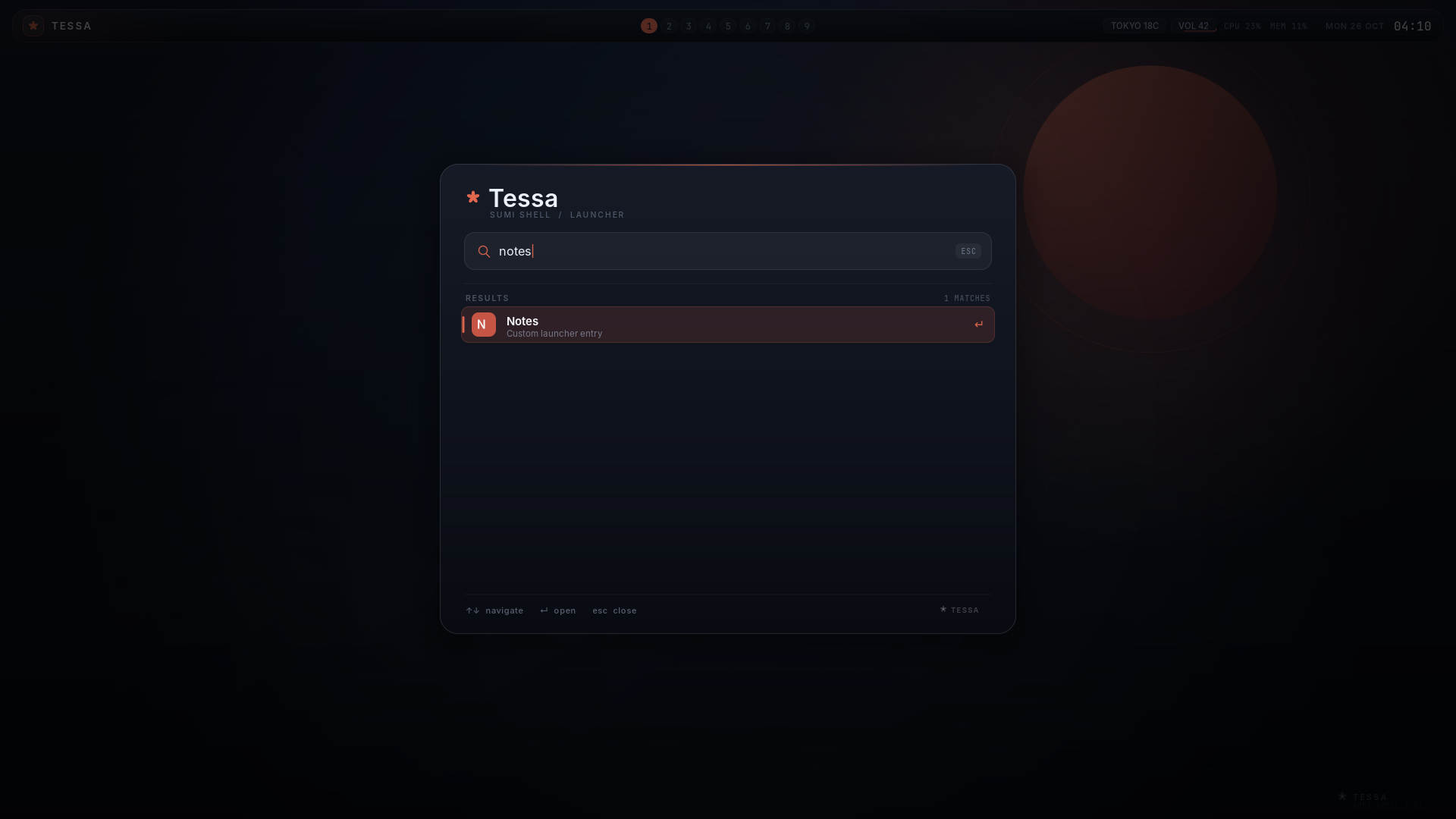
Tessa does not embed a plugin VM. Extensions are normal processes that speak the
compositor’s Unix-socket API; they can be written in any language. tessa-ctl
exposes state snapshots, structured events, status entries, and commands:
tessa-ctl statetessa-ctl state --jsontessa-ctl configtessa-ctl config --jsontessa-ctl config-checktessa-ctl events window-focustessa-ctl status weather "Tokyo 18C"tessa-ctl dispatch reloadstate --json and config --json return schema-versioned snapshots for tools.
config-check prints file/line diagnostics and exits non-zero while the loaded
configuration has errors. Configuration can also start commands at login and
react to compositor events:
startup = fcitx5 -dhook = window-open notify-send "Window opened" "$TESSA_TITLE"hook = animation-done echo "$TESSA_ARG $TESSA_WINDOW_ID" >> ~/.cache/tessa-animations.loghook = close-animation-done echo "closed $TESSA_WINDOW_ID" >> ~/.cache/tessa-animations.loglauncher_entry = Notes | foot -e nvim ~/notes.mdinclude = /home/you/.config/tessa/launcher-entries.confThe panel displays up to eight extension status entries and can run a command when one is clicked. See docs/EXTENDING.md for the complete event schema, hook environment, and status API.
Key bindings
Section titled “Key bindings”| Binding | Action |
|---|---|
Super+Return |
terminal (terminal config value) |
Super+D |
launcher |
Super+V |
clipboard history |
Super+Shift+S |
screenshot region/full output |
Super+M |
MPRIS media controls |
Super+Shift+T |
StatusNotifier tray |
Super+Shift+A |
volume controls |
Super+T |
cycle through layout_cycle (master → mosaic → grid → columns by default) |
Super+Q |
close focused window |
Super+Shift+E |
quit Tessa |
Super+R |
reload config |
Super+1 … Super+9 |
switch workspace |
Super+Shift+1 … Super+Shift+9 |
move window to workspace |
Super+H/J/K/L |
focus left/down/up/right |
Super+left-drag |
reorder a tiled window (inserts a column in scrolling layouts) |
Super+wheel |
scroll the viewport in a scrolling layout |
Super+Shift+H/J/K/L |
swap with window in that direction; if there is none, move the window to the adjacent output |
Super+Space |
toggle floating |
Super+F |
toggle fullscreen |
Super+grave |
toggle scratchpad |
Super+Shift+grave |
move focused window to/from scratchpad |
Super+Shift+G |
group/ungroup tiled windows on the workspace |
Super+Escape |
lock the session (runs swaylock; install it first) |
Super+Tab / Super+Shift+Tab |
cycle windows; cycle tabs while a group is focused |
Super+Ctrl+H/L |
shrink/grow master ratio |
Super+Alt+H/L |
shrink/grow a floating window horizontally |
Super+Alt+J/K |
grow/shrink a floating window vertically |
Mouse:
- Click a window to focus. Click a taskbar chip to focus it.
- Right-click a taskbar chip to close that window.
- Scroll over the bar to cycle workspaces.
Super+Left-dragmoves a floating window;Super+Right-dragresizes it.- Client-side titlebar drags work for floating windows too.
- Click the petal/
TESSAmark, or pressSuper+D, for the launcher. - Right-click the
TESSAmark for the power menu. Click the clock for the calendar. Both can also be opened withtessa-ctl panel calendar|power|clipboard. - In the launcher: type to search,
Up/Down,Enter,Esc, or click a row. - In the calendar:
Left/Rightor the arrow buttons change months;Homereturns to today. In the power menu:Up/Down,Enter,Esc, or click. Super+Vopens clipboard history. Select an entry withUp/DownandEnter, or click it, to put it back on the clipboard. History is limited to eight text entries of up to 16 KiB each and is kept in memory only.Super+Shift+Sstarts the screenshot UI. Drag to select a region, click for the full output, or pressEnter;Esccancels. PNGs are written toscreenshot_dir(default~/Pictures/Screenshots).- When an MPRIS player is active, a media chip appears in the bar. Click it or
press
Super+Mfor previous/play-pause/next;Space,Left, andRightwork from the keyboard as well. - StatusNotifier items appear as icons in the bar. Left-click activates an item;
right-click or
Super+Shift+Topens the tray popover.Up/Downselects andEnteractivates. DBusMenu context menus are not implemented. - The bar shows output volume when
wpctl,pactl, oramixeris available. Click it or pressSuper+Shift+A.Up/Downchanges volume,mtoggles mute, andEsccloses. Usevolume_status,volume_up,volume_down, andvolume_muteto override the detected commands.
Configuration
Section titled “Configuration”Copy the example:
mkdir -p ~/.config/tessacp config/config.example ~/.config/tessa/configThe full configuration used on the development machine is available as
examples/vermilion-ink.config.
The format is key = value. Comments are lines starting with #.
At runtime Super+R reloads the config. A reload with errors is rejected and
the previous configuration stays active; tessa-ctl config-check reports the
diagnostics. Selected keys:
| Key | Meaning |
|---|---|
terminal |
command used for Super+Return and Terminal=true desktop apps |
gaps |
gap between tiled windows |
outer_gaps |
gap around the tiling area |
border_width |
active/inactive frame thickness |
master_ratio |
master area ratio (0.15–0.9) |
master_count |
windows stacked in the master column |
mosaic_ratio |
slice ratio for mosaic (0.25–0.85) |
mosaic_min_size |
minimum mosaic tile before falling back to grid |
grid_columns |
fixed grid columns; 0 chooses ceil(sqrt(n)) |
default_column_width |
scrolling column width: 50%, 0.5, or fixed pixels |
column_width_presets |
comma-separated widths for column-width-cycle |
center_focused_column |
scrolling focus policy: never, always, on-overflow |
animation_view_ms |
scrolling viewport slide duration (0–1000 ms) |
animation_view_curve |
curve used by the scrolling viewport |
layout_cycle |
comma-separated layouts visited by Super+T |
extension |
supervised extension manifest (id=…; command=…; permissions=…) |
panel_modules |
panel parts to create: bar, launcher, notifications, popovers, etc. |
layout_helper |
command for one long-lived asynchronous helper per output |
layout_helper_timeout |
helper response timeout in milliseconds (10–1000) |
layout |
default layout: master, mosaic, grid, columns, scrolling, monocle, stacking/deck, or custom |
layout_1 … layout_9 |
initial layout for a workspace without a saved override |
workspace-rule |
per-workspace layout/gap/master overrides and profiles |
output-rule |
per-output layout/tuning/theme/VRR overrides matched by connector or EDID |
profile |
named layout/tuning profile referenced by rules |
event-rule |
conditional event-to-command rule |
theme-role |
semantic color role shared by compositor and panel |
workspace_pin |
bind a workspace to an output: workspace_pin = eDP-1 3 (repeatable) |
workspace-name |
global workspace name: workspace-name = 2 Code (repeatable) |
corner_radius |
rounded window radius, 0–64 (scenefx builds) |
blur |
backdrop blur for translucent surfaces (scenefx builds) |
blur_radius |
blur radius, 1–32 |
blur_passes |
blur quality passes, 1–5 |
panel |
auto-start tessa-panel |
xwayland |
start xwayland-satellite and export DISPLAY |
xwayland_display |
auto, or an explicit display such as :0 |
xim |
export XMODIFIERS and optionally start an XIM server |
xim_server |
XIM server name used in XMODIFIERS (default fcitx) |
xim_start |
optional command started after the X display appears |
gestures |
enable compositor touchpad swipe gestures |
gesture_fingers |
finger count for workspace/launcher swipes (2–5) |
gesture_workspace_threshold |
horizontal swipe distance for a workspace switch |
gesture_launcher_threshold |
upward swipe distance for the launcher |
touch |
accept touch input devices |
tablet |
enable tablet-v2 tools and pads |
pointer_constraints |
enable pointer-constraints-v1 |
cursor_theme |
Xcursor theme name; empty uses the system default |
cursor_size |
cursor size in logical pixels (16–96) |
input / input-rule |
per-device libinput policy; repeatable |
kb_layout |
XKB layout, for example us or us,de |
kb_variant |
XKB variant (optional) |
kb_options |
XKB options, for example grp:alt_shift_toggle |
kb_model |
XKB model (optional) |
kb_rules |
XKB rules file (optional) |
repeat_rate |
key repeat rate in repeats per second |
repeat_delay |
delay before key repeat starts, in milliseconds |
accent |
accent color used by borders, bar, launcher |
bg |
base background color for the wallpaper |
wallpaper_image |
PNG wallpaper path; replaces the gradient/art |
wallpaper_fit |
cover, contain, or stretch image fit |
font |
UI family for the panel |
include |
include another config file |
startup |
command run once at startup |
hook |
run a command for a compositor event |
launcher_entry |
extra launcher item (Name | command) |
output_config |
path for persisted output mode/position/scale/transform and layout overrides |
bar_height |
panel bar height (32–96 logical pixels) |
bar_top_margin |
panel distance from the top edge (0–64) |
bar_side_margin |
panel left/right margin (0–128) |
panel_bg |
panel bar background color |
panel_fg |
panel bar primary text color |
power_lock |
command for the power menu’s Lock action |
power_suspend |
command for Suspend (default systemctl suspend) |
power_reboot |
command for Reboot (default systemctl reboot) |
power_off |
command for Power Off (default systemctl poweroff) |
screenshot_dir |
PNG output directory (default ~/Pictures/Screenshots) |
border_active |
focused border color (defaults to accent) |
border_inactive |
unfocused border color |
window-rule |
declarative rule; see the customization guide |
layer-rule |
layer-shell rule; see the customization guide |
workspace-rule |
per-workspace layout, gaps, and master ratio |
mode |
start a named input-mode section for following bind lines |
leader |
leader chord that enters the leader mode |
leader_timeout |
leader-mode timeout in milliseconds |
mode_timeout |
timeout for the current named mode in milliseconds |
Additional bindings use XKB keysym names:
bind = SUPER+Return terminalbind = SUPER+1 workspace 1bind = SUPER+SHIFT+1 move-to-workspace 1bind = SUPER+h focus leftbind = SUPER+SHIFT+h move leftbind = SUPER+ctrl+h ratio -0.03Available actions: terminal, spawn, close, quit, workspace,
move-to-workspace, focus, move, toggle-float, toggle-fullscreen,
toggle-scratchpad, move-to-scratchpad, special/toggle-special,
move-to-special, toggle-group, group-next,
group-prev, group-add, group-remove,
focus-next, focus-prev, launcher, clipboard, screenshot, media,
tray, audio, reload, ratio, toggle-layout,
set-layout, resize-width, resize-height, enter-mode. Scrolling adds
focus-column-left/right/first/last, move-column-left/right/first/last,
move-window-up/down, consume-window, expel-window,
column-width-cycle[-back], column-width-set <width>,
column-width-maximize, and center-column.
Super+T cycles the focused workspace through layout_cycle (the four original
layouts by default). Runtime layout
choices are kept per output and workspace and saved to outputs.conf. layout_N
only seeds workspaces that have no saved or runtime override; a config reload
updates every workspace you have not overridden and leaves your runtime choices
alone. resize-width and resize-height take a pixel delta and act on the focused
floating window.
While a tiled window is focused, Super+left-drag reorders it; release over a
window to insert before/after it, and the target is highlighted while dragging.
In scrolling layouts the whole column moves, and Super+wheel scrolls the
column strip. These gestures do not apply to floating or fullscreen windows.
The swap and reorder IPC commands operate on the flat tiled order; in a
scrolling workspace use column-move, window-move, or a drag instead.
Window rules are one line each. Match app-id, title, or output with */?
patterns and apply actions in order:
window-rule = app-id=pavucontrol; float=truewindow-rule = title=Picture-in-Picture; float=true; position=40,40window-rule = app-id=firefox; workspace=2window-rule = title=GIMP*; float=falsewindow-rule = match=app ~ "^firefox$" && title !~ "Private|Incognito"; workspace=2window-rule = title=Chat*; border-active=#4cc9f0; border-inactive=#1b2a41window-rule = app-id=mpv; opacity=0.9; border-width=0; corner-radius=0window-rule = title=Picture-in-Picture; opacity=0.85; corner-radius=14; blur=trueRules are applied when a window maps and re-evaluated on config reload.
Decorative actions (colors, opacity, rounding, blur, shadow, border width) and
per-window motion overrides (animation, animation-ms, animation-curve,
and per-kind variants) also re-apply when the title or app-id changes;
structural actions wait for the next map or reload. Layer-shell clients use
layer-rule with
namespace, output, layer, opacity, corner-radius, and blur clauses.
Run tessa-ctl config to inspect the parsed rules and tessa-ctl state for
effective window/layer values. See
docs/CUSTOMIZATION.md for the complete reference.
Input modes group bindings and activate them with enter-mode:
mode = resizebind = h resize-width -30bind = l resize-width 30bind = Escape enter-mode default
mode = defaultbind = SUPER+SHIFT+r enter-mode resize
While a mode is active, its bindings match even without Super. Global bindings
still work, and unbound keys reach the focused client. tessa-ctl mode resize
switches modes from a script. The active mode is shown as MODE <name> in
tessa-ctl state.
Per-workspace tuning uses the same key=value; ... style:
workspace-rule = ws=2; layout=grid; gaps=4; outer-gaps=8; master-ratio=0.65Custom tiling is selectable with layout = custom. Tessa starts one
asynchronous helper per output and sends it the active tiled windows, usable
area, focus, and urgency state; the helper returns frame rectangles. The helper
is not part of the Super+T cycle, so bind it explicitly if wanted:
layout = customlayout_helper = python3 ~/.config/tessa/layout.pylayout_helper_timeout = 100bind = SUPER+SHIFT+T set-layout customTimeouts, crashes, malformed replies, and missing rectangles fall back to the master layout for that frame. See docs/CUSTOMIZATION.md for the protocol.
How it works
Section titled “How it works”- docs/GUIDE.md — complete setup, configuration, and customization guide for the current tree
- docs/CUSTOMIZATION.md — window rules, layout tuning, appearance, and the customization model
- docs/ARCHITECTURE.md — components, scene graph, IPC, layer-shell sizing, panel rendering
- docs/EXTENSION-API.md — the stable extension API v1 contract, permissions, tokens, lifecycle, and conformance tests
- docs/BENCHMARK.md — wayland-compositor-bench results, method, and raw JSON for the reference session
- docs/ROADMAP.md — what is missing and what comes next
- docs/DEVELOPMENT.md — the SSH/headless development loop used for this repository
Short version:
tessa (wlroots compositor, Zig) ├─ backend: DRM / headless / nested Wayland ├─ wlr_scene: wallpaper < layer background < windows < floating < top bar │ < fullscreen < launcher overlay ├─ master/stack + mosaic + grid + columns, 9 workspaces, floating, fullscreen └─ IPC: $XDG_RUNTIME_DIR/tessa.sock ▲tessa-panel × outputs (Wayland client, Zig + Cairo/Pango) ├─ background layer (ink/sun wallpaper) ├─ top layer (floating taskbar) └─ overlay layer (launcher, exclusive keyboard)The panel uses three wl_shm buffers per surface, draws with Cairo, and renders
text through the small C shim in panel/text.c (Pango). The compositor and panel
exchange a deliberately simple line protocol:
STATEACTIVE 1OCC 1 2...WIN\t1\t1\t1\t0\t0\tkitty\tnotes\teDP-1\t40\t30\t1100\t700END
CMD workspace 3 eDP-1CMD workspace CodeCMD move-workspace 3CMD toggle-scratchpadCMD move-to-scratchpadCMD toggle-groupCMD group-nextCMD focus 4CMD close 4CMD spawn kittyCMD launcher [query]CMD layout [name] [output]CMD resize <dx> <dy>CMD float <id>CMD quit
The IPC socket is created as mode 0600 under $XDG_RUNTIME_DIR.
Known limitations
Section titled “Known limitations”These are real and important:
- DRM/libinput is exercised on Arch Linux, with device-specific gaps. A real Arch Linux session (including display-manager startup), DRM output, keyboard, mouse, IME, and XWayland clients have been exercised. Per-device touchpad tuning, VRR/adaptive-sync commits, and unusual multi-GPU/monitor combinations still need validation on the matching hardware; headless tests cover the configuration and protocol paths.
- External shells are opt-in. Tessa Panel remains the default and is not
auto-disabled when Waybar, Quickshell, or Wofi starts. Set
panel = falsefor an external bar; two bars on the same edge reserve space twice. Ext-workspace advertises workspace activation only (Tessa has fixed nine-workspace groups), and foreign-toplevel minimize/maximize requests are no-ops. Tessa Panel, Waybar, and Quickshell trays compete for the single StatusNotifierWatcher. - Kitty needs working EGL/GL. On virtual machines without GPU acceleration,
Kitty may fail to create a window even when Tessa runs. Use
foot, software Mesa, orterminal = foot. Tessa falls back to foot only when Kitty is not installed. - Fractional scaling is partial. Fractional-scale-aware Wayland clients get
the exact output scale, including runtime changes. The panel still uses an
integer Cairo buffer scale, so fractional scales are downsampled there, and
legacy clients fall back to the ceiling. XWayland scaling depends on
xwayland-satelliteand was not validated in the headless test environment. - Disabled outputs are not persisted.
wlr-randr --offis runtime-only; the saved output entry re-enables that output on the next start. - One panel process per output. This keeps each bar independent but uses more memory than a single multi-surface panel; a panel crash only affects its monitor.
- Lock-screen testing is basic.
ext-session-lock-v1is implemented and was tested with a minimal lock client; a real swaylock/PAM setup still needs a physical-session test. If the lock client disappears while locked, Tessa terminates rather than silently unlocking. - Idle timing is external. Tessa exposes idle notifications, inhibitors, and
output power management;
swayidle/wlopm(or another idle daemon) must be running if you want automatic blanking or locking. - Clipboard history is text-only and in memory. It keeps eight entries of up
to 16 KiB and never writes them to disk.
wlr-data-control-v1is exposed to session clients, so any trusted application can read the selection without keyboard focus; treat session applications as trusted. - Notifications are intentionally basic. The panel owns
org.freedesktop.Notificationsand supports actions, adefaultclick action, static icons (image-data/image-path/icon-name), Pango markup, replacement, close, and expiry. Cross-output routing sends toasts to the focused output. Rich HTML markup beyond Pango’s subset, notification sounds, and per-notification output pinning are not implemented. - Window effects depend on the build. Open and workspace transitions slide
the window frame with configurable named cubic-bezier or spring curves,
per-window overrides, and offsets.
Compositor-initiated closes capture the window surface and scale/fade that
snapshot with a configurable curve, scale, and fade; a client that closes
itself is removed immediately because its buffer is already gone at unmap. Shadows
are fixed layered rectangles. Window and layer rules can override opacity,
border width, shadows, and, in a scenefx build, rounding and blur per surface.
Rounded corners and backdrop blur are part of the default scenefx build; a
-Dscenefx=falsebuild omits them. The scenefx build uses scenefx’s GLES2 renderer and cannot use the pixman software renderer. Blur is only visible for translucent clients and shell layers. Setanimations = falseorreduce_motion = trueto disable movement;reduce_motion_animations = fadekeeps a close fade. - System indicators are intentionally basic. Battery uses
/sys/class/power_supplyand network uses the default route plusoperstate. MPRIS controls the first discovered player and does not display album art. - The tray has no menus. StatusNotifier registration, pixmap/icon-name rendering, activation, status, and removal are implemented. DBusMenu context menus and secondary activation hover are not yet wired up.
- Volume is a command bridge. Tessa detects
wpctl(PipeWire),pactl(PulseAudio), oramixer(ALSA) and executes it on a worker thread. Systems without one of these tools show no volume indicator; custom commands can be supplied in the panel config. - Screen sharing needs the portal packages. Tessa exposes the compositor
side (
wlr-screencopy, linux-dmabuf where available, output image-capture sources, image-copy capture, and foreign-toplevel lists). Installxdg-desktop-portal,xdg-desktop-portal-wlr, and a running PipeWire server, and install the packagedtessa.portalfile. The included end-to-end test verifies monitor screencasting; window-source capture depends on the portal backend’s protocol support. - No gamma or output configuration UI.
- Touch and tablet hardware still needs a physical test pass. The touch seat capability, scene hit-testing, tablet-v2 tools/pads, and the panel’s touch handlers are implemented, but the automated suite runs on headless outputs without touch or tablet hardware. Gesture thresholds may need tuning for a particular touchpad.
- XIM registration is verified, not every toolkit. Tessa exports
XMODIFIERS, waits for the X display, and startsxim_startwhen configured. The test confirms that Fcitx5 owns the XIM server selection. Committed text in a specific X11 toolkit still depends on that toolkit’s XIM client. - IME coverage. Wayland text-input-v3 clients and the panel are verified with Fcitx5 + Mozc. Dead keys through unusual layouts and input-method popup repositioning during scroll are not covered.
- XWayland needs
xwayland-satellite. Tessa does not bundle it. If it is missing, X11 applications simply do not start; Wayland clients are unaffected. - Extensions are trusted local processes. They run with the session user’s full privileges; there is no sandbox. State/config snapshots are versioned JSON, and JSON-RPC read methods plus JSON event subscriptions are available, but mutation still uses the line command plane. Status entries are limited to eight short strings.
- Layout-helper responses are complete snapshots. Per-output asynchronous helpers, focus/urgent metadata, and version negotiation are implemented, but partial streaming rectangle updates are not.
- Config editing is terminal-based.
tessa-ctl config-check FILE,config-diff FILE, andconfig-editprovide validation, an effective-config diff preview, and confirmed apply/reload while the compositor is running.config-edituses$VISUAL/$EDITOR; there is no separate GUI editor, and validation/diff requires a running compositor. - Layer-shell/kbd focus uses wlroots 0.20 unstable APIs; pin the wlroots version when packaging.
- The launcher scans
.desktopfiles; if you have only a few installed, the list will be short. It does not use icon themes yet (monogram tiles instead).
License
Section titled “License”Tessa is released under the MIT License. See LICENSE.
Credits
Section titled “Credits”Built from scratch for this project, with wlroots and the tinywl example as the
reference for the compositor’s event-loop structure. Cairo/Pango draw the shell;
the Pango shim exists because Zig’s translate-c currently chokes on GLib’s
_Pragma deprecation macros. Foot is used as the test terminal; kitty is the
default terminal.